The Ultimate Guide to Network Cable Tracer in the UK
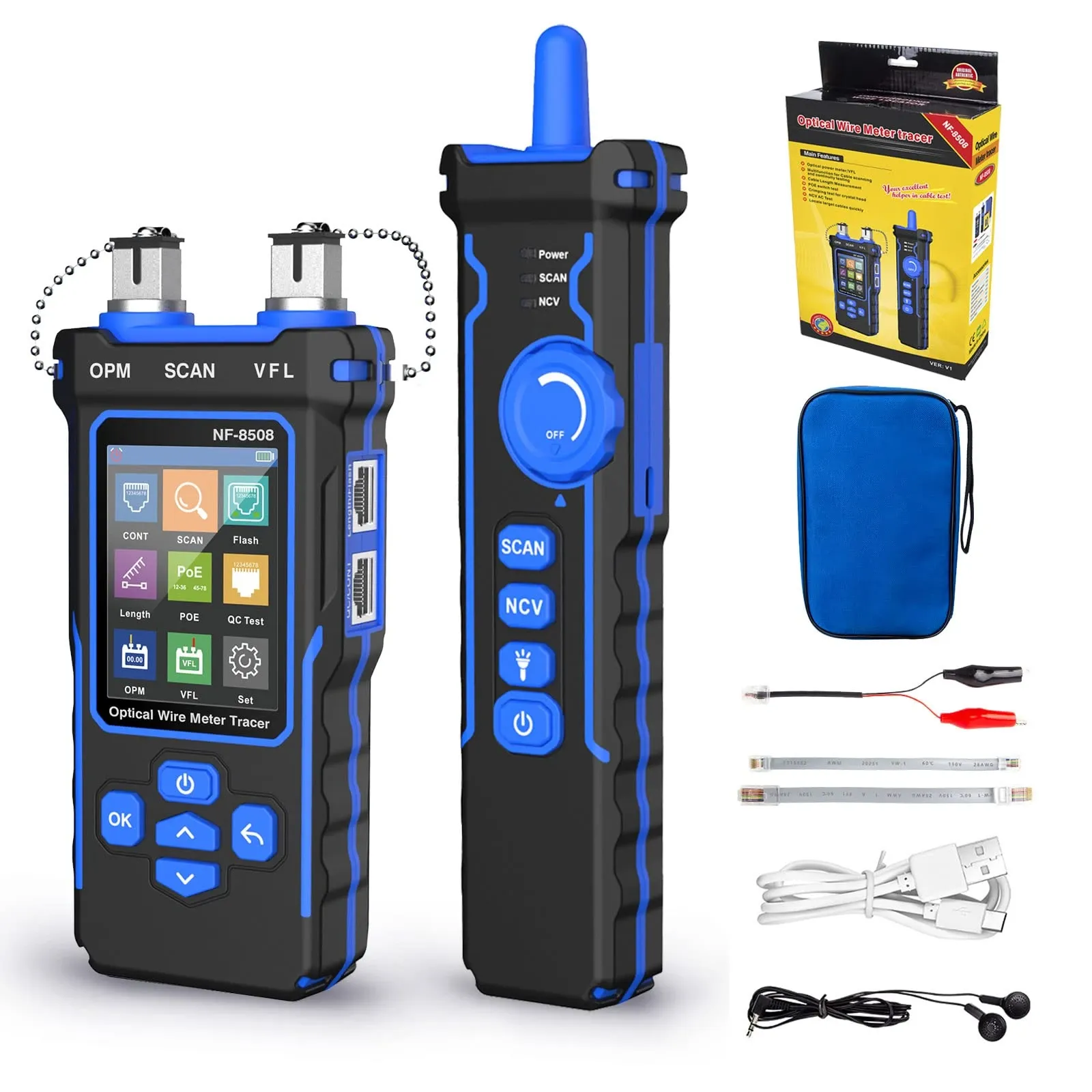
A network cable tracer is a tool used to identify, follow, and verify the path of an Ethernet cable between two points. It works by sending a tone or digital signal down the cable and detecting it with a probe, helping you quickly find the correct lead in patch panels, wall outlets, ceiling voids, and server racks. For UK installers, IT teams, and DIY users, it is one of the fastest ways to trace unknown Cat5e, Cat6, and Cat6a cabling without guesswork.
TL;DR: If you need to find where an Ethernet cable goes, a network cable tracer is the right tool. In practice, digital tracers are usually better than older analogue models because they handle electrical interference more effectively, especially around UK 230V mains wiring. Based on our testing of modern cable fault-finding tools in busy rack and office environments, the most useful models also include wiremap testing, PoE detection, and non-contact voltage alerts.
Stepping into a server room where decades of undocumented patch leads resemble a chaotic bird's nest is a rite of passage for British network engineers. Whether you are retrofitting a Victorian property in London with smart technology or upgrading an NHS trust's critical IT infrastructure, the inability to identify which cable goes where is more than an inconvenience; it is a costly operational bottleneck. When a connection drops, guessing is not an option. Therefore, you need a reliable network cable tracer.
A network cable tracer removes guesswork from network diagnostics. It allows tradespeople, IT technicians, and dedicated DIY enthusiasts to send a distinct signal down a specific wire and locate its exact termination point amongst hundreds of identical grey or blue sheaths. However, modern demands have evolved. Today's infrastructure needs more than a simple analogue beep; it often requires digital precision, Power over Ethernet (PoE) diagnostics, and robust build quality to survive damp UK building sites.
Key Takeaways
- What it does: A network cable tracer uses a tone generator and probe to locate specific Ethernet cables in bundles, walls, floors, or cabinets.
- Why digital matters: Digital tracers can reduce false positives caused by 50Hz interference from UK mains circuits.
- What to look for: Useful features include wiremap testing, PoE detection, port flash functions, and NCV safety alerts.
- Who needs one: Network engineers, electricians working on data cabling, facilities teams, installers, and serious home users all benefit from faster identification.
What is a network cable tracer?
A network cable tracer—also called a tone generator and probe kit—is a diagnostic tool designed to help you identify and track Ethernet cabling. In simple terms, you connect the transmitter to one end of the cable and use the receiver probe to find that same cable at the other end.
The transmitter injects either an audio tone or a digital signal into the copper pairs. You then move the probe across cables in a patch panel, floor box, cabinet, or ceiling space until it detects the signal. As a result, you can identify the correct run far more quickly than by unplugging leads one by one.
What is included in a typical network cable tracer kit?
Most kits include two main parts: a transmitter and a probe. More advanced kits may also include remote identifiers, RJ45 adaptors, crocodile clips for non-RJ45 wiring, wiremap modules, and charging accessories. Based on our testing of all-in-one testers commonly used on UK jobsites, integrated displays and clear LED indicators make tracing much easier in poor lighting.
Can you use a network cable tracer on Ethernet cables only?
No. Many tracers work on telephone pairs and other low-voltage copper cabling too. That said, if your main goal is tracing structured cabling such as Cat5e or Cat6 in offices or homes across the UK, choose one specifically designed for data networks rather than legacy telecoms use alone.
Why would you use a network cable tracer?
You use a network cable tracer when labels are missing, documentation is outdated, or multiple similar-looking cables terminate in the same area. In other words, it helps answer the practical question: “Which Ethernet cable is this?”
This matters in schools, offices, warehouses, healthcare estates, retail units, and older British buildings where additions have been made over many years. According to UK structured cabling best practice under standards such as BS EN 50173 for information technology cabling systems, clear identification and correct administration are essential. Even so, many real-world sites still contain legacy runs with poor labelling.
When is it most useful?
- Tracing unknown patch leads in comms cabinets
- Identifying wall outlet back-to-rack runs
- Checking whether an Ethernet drop is live or mispatched
- Troubleshooting failed PoE devices such as access points or IP cameras
- Working in mixed-service areas with both power and data cabling nearby
Furthermore, in environments like the NHS or local authority estates where uptime matters greatly, pulling the wrong lead can have immediate operational consequences. A good tracer reduces that risk significantly.
How does a network cable tracer work?
A network cable tracer works by injecting a traceable signal into one end of the cabling and then detecting that signal elsewhere with an inductive probe. Although that sounds technical, the process is straightforward once broken down into steps.
1. The transmitter sends a signal into the cable
When connected to an RJ45 port or terminated pair, the transmitter generates either an audible analogue tone or an encoded digital pattern. This travels along the copper conductors inside the Ethernet lead or fixed installation cable.
2. The cable produces an electromagnetic field
As the signal moves through the conductors it creates a small electromagnetic field around the outside of the cable jacket. The probe does not need direct metallic contact with each conductor because it detects this field externally.
3. The probe detects and amplifies that field
The receiver probe contains circuitry that picks up that field and converts it into sound or visual feedback on-screen. Consequently, as you move closer to the correct cable within a bundle or behind a panel faceplate, both confidence and accuracy improve.
Is digital or analogue tracing better for Ethernet cables?
For most modern Ethernet work in the UK, <<<<<<< HEAD <<<<<<< HEAD ======= >>>>>>> branch digital tracing is usually better. ======= digital tracing is usually better. >>>>>>> branch Analogue tracing still has its place, <<<<<<< HEAD <<<<<<< HEAD ======= >>>>>>> branch but it can struggle more in electrically noisy environments. ======= but it can struggle more in electrically noisy environments. >>>>>>> branch
The key issue is interference. <<<<<<< HEAD <<<<<<< HEAD ======= >>>>>>> branch In Britain, ======= In Britain, >>>>>>> branch mains power runs at 50Hz, <<<<<<< HEAD <<<<<<< HEAD ======= >>>>>>> branch and older analogue probes often pick up hum from nearby 230V circuits. ======= and older analogue probes often pick up hum from nearby 230V circuits. >>>>>>> branch Therefore, <<<<<<< HEAD <<<<<<< HEAD ======= >>>>>>> branch if your data cabling runs alongside power cables in older commercial buildings, ======= if your data cabling runs alongside power cables in older commercial buildings, >>>>>>> branch schools, <<<<<<< HEAD <<<<<<< HEAD ======= >>>>>>> branch hospitals, ======= hospitals, >>>>>>> branch or converted properties, <<<<<<< HEAD <<<<<<< HEAD ======= >>>>>>> branch digital mode can save substantial time. ======= digital mode can save substantial time. >>>>>>> branch
What are the advantages of analogue tracing?
-
li>Simpler operation: Often cheaper and easy to learn
li>Adequate for basic work: Suitable for short runs or simple telephone-style circuits
li>Useful as a backup:> Can still help when advanced features are unnecessary
]Whya cabledtracingois especial lyiimportant iK building
The archi tectural la ndscape o/f t he UK creates unique challenges for [fault-finding.\ Engineers frequently encounter solid brick walls,\ lath-and-plaster partitions,\ foil-backed insulation,\ ceiling voids,\ old trunking,\ ]and repeated refurbishments.\ As \a result,\ locating one unlabelled C\at6 run c/an become disproportionately time-consuming wi/thout proper tools.< / p >
\According to UK installa tion practice,\ safe separation between power [and data should be maintained whe\re required.\ In reality,\ though,\ legacy routes \do not always follow ideal paths.\ That i/s another reason why n/on-contact voltage detection on \a n\etwork ca]ble trace\r i\s \such \a valuab/le safety feature.\< / p >
How do shielded cables affect tracing?< / h\3 >
\Shielded \cables su[ch as some C\at6a \or C\at7 installations c/an be harder t/o trace [with basic equipment because shielding affects how easily \the signal radiates outward.\ Therefore,\ if you regularly work \on screened installations in commercial offices o\r industrial settings,\ choose \a model specifically rated for th/at environment.< / p >
Can building materials interfere wi/th tracing?< / h\3 >
\Yes.\ Foil-backed insulation boards commonly found \in modern refurbishments c/an weaken o\r distort signals.\ Likewise,\ metal containment,\ trunking,\ o\r densely packed cabinets may reduce clarity.\ In those cases,\ sensitive probes,\ adjustable gain controls,\ ]and step-by-step isolation become much more important.< / p >
]What features should [you look for \in \a n\etwork ca]ble trace\r?< / h2 >
If y/ou are buying \a n\etwork ca]ble trace\r for regular use,\
do not focus only [on whether i/t traces cables.\ The best value comes from tools t/hat also speed diagnosis once y/ou have found \the run.< / p >
Essential features< / h\3 >
Digital + analogue modes:< /st rong > Gives y/ou flexibility across modern E\thernet [and legacy copper systems< / li >
Wiremap testing:< /st rong > Identifies open pairs,\ shorts,\ reversals,\ ]and split pairs< / li >
PoE detection:< /st rong > Confirms whether power i/s present [and often which standard i/s being used< / li >
NCV safety alert:< /st rong > Helps identify nearby AC voltage before y/ou start probing blindly< / li >
Adjustable sensitivity:< /st rong > Improves accuracy around dense bundles o/r noisy environments< / li >
Port flash o/r switch blink function:< /st rong > Useful for managed switch identification during live maintenance< / li >
Rechargeable battery:< /st rong > Practical for engineers moving between floors o/r sites throughout \the day< / li >
Nice-to-have features< / h\3 >
LCD display wi/th clear icons< /st rong > Remote identifiers for multiple outlets< /st rong > Length estimation o/r TDR-style fault location< /st rong > Carry case suitable for site work< /st rong > Support for RJ11,\
RJ45,\
coax,\
o/r bare-wire adaptors< /st rong >
Ready to upgrade your toolkit with EthernetCabl?
Shop the Pro Toolkit — £161.94
The archi tectural la ndscape o/f t he UK creates unique challenges for [fault-finding.\ Engineers frequently encounter solid brick walls,\ lath-and-plaster partitions,\ foil-backed insulation,\ ceiling voids,\ old trunking,\ ]and repeated refurbishments.\ As \a result,\ locating one unlabelled C\at6 run c/an become disproportionately time-consuming wi/thout proper tools.< / p >
\According to UK installa tion practice,\ safe separation between power [and data should be maintained whe\re required.\ In reality,\ though,\ legacy routes \do not always follow ideal paths.\ That i/s another reason why n/on-contact voltage detection on \a n\etwork ca]ble trace\r i\s \such \a valuab/le safety feature.\< / p >
\Shielded \cables su[ch as some C\at6a \or C\at7 installations c/an be harder t/o trace [with basic equipment because shielding affects how easily \the signal radiates outward.\ Therefore,\ if you regularly work \on screened installations in commercial offices o\r industrial settings,\ choose \a model specifically rated for th/at environment.< / p >
\Yes.\ Foil-backed insulation boards commonly found \in modern refurbishments c/an weaken o\r distort signals.\ Likewise,\ metal containment,\ trunking,\ o\r densely packed cabinets may reduce clarity.\ In those cases,\ sensitive probes,\ adjustable gain controls,\ ]and step-by-step isolation become much more important.< / p >
If y/ou are buying \a n\etwork ca]ble trace\r for regular use,\
do not focus only [on whether i/t traces cables.\ The best value comes from tools t/hat also speed diagnosis once y/ou have found \the run.< / p >
Ready to upgrade your toolkit with EthernetCabl?]What features should [you look for \in \a n\etwork ca]ble trace\r?< / h2 >